

We use essential cookies to make our site work. With your consent, we may also use non-essential cookies to improve user experience and analyze website traffic. By clicking “Accept,” you agree to our website's cookie use as described in our Cookie Policy. You can change your cookie settings at any time by clicking “Preferences.”
 
 
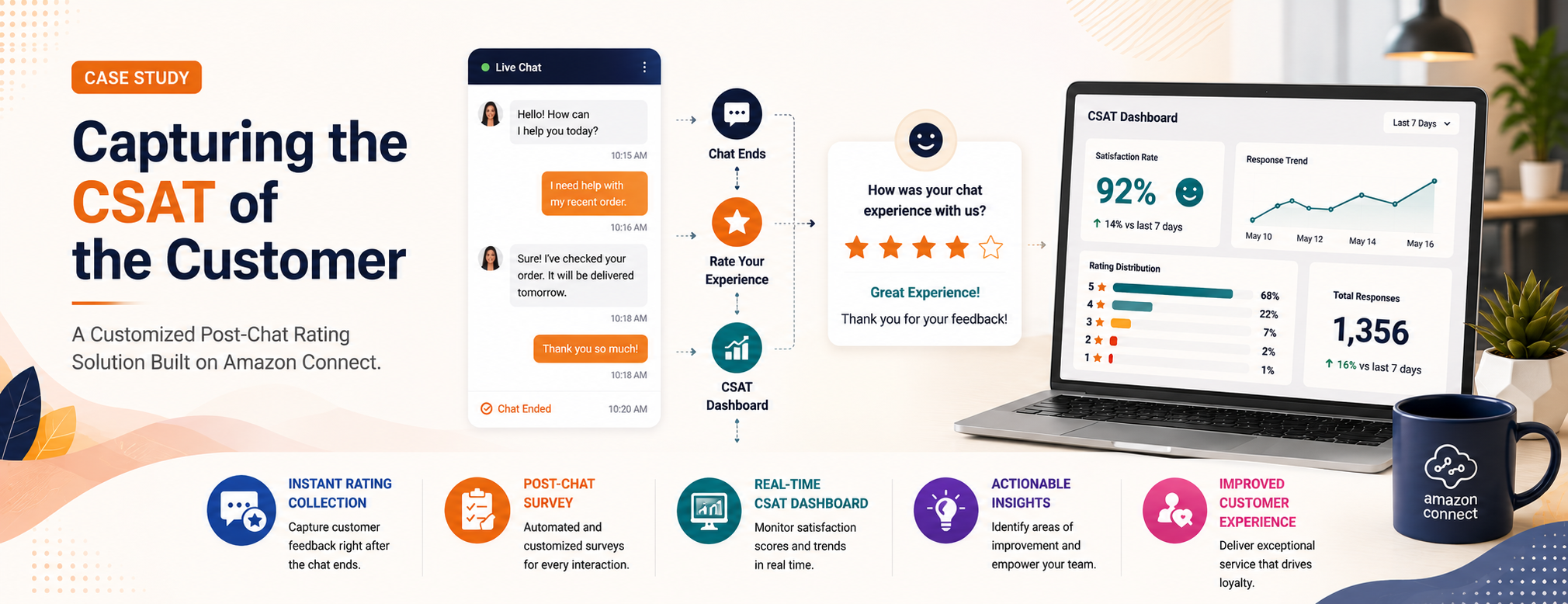
Capturing the CSAT of the Customer
Automatic capturing of feedback post-chat
Ratings and comments automatically linked to sessions
Full visibility in Contact Search


Overview
 
Live chat has become one of the most popular ways customers reach out for help — it is instant, convenient, and fits naturally into how people already use their phones and computers. But there is a problem that most businesses do not notice until it is too late: when a chat window closes, the customer experience often disappears with it.
 
Unlike phone calls, where a follow-up survey can be sent by email or text, chat conversations end abruptly. The moment a customer closes the chat, the window to capture their feedback is gone. Our client runs a customer support operation using Amazon Connect — a cloud-based platform that handles customer contact across multiple channels, including live chat.
 
The Challenge
 
While the team was successfully handling customer chat interactions, a gap existed after the conversation ended. Once a customer submitted a post-chat rating, the feedback was saved as a separate record without any direct link to the corresponding chat session. This made it impossible for supervisors to identify the conversation that resulted in a low satisfaction rating or investigate the underlying cause.
 
Key Challenges
 
Silent Customer Dissatisfaction
 
Customers close the chat unhappy and never come back — there is no record of why.
No Agent Performance Loop
 
Agents handle dozens of chats a day with no feedback on which ones went well or poorly.
Disconnected Feedback Records
 
Ratings collected via separate email surveys cannot be matched back to the specific chat session.
 
 
How It Works
 
The solution works quietly in the background, without changing anything for agents or customers. It listens for the moment a chat session ends and then automatically captures and stores whatever feedback the customer provided.
 
Step 1
Chat Session Ends

The customer finishes their chat with an agent and closes the chat window. The conversation is complete, and the system registers the session ending as its own distinct event.

Step 2
Validate Genuine Chat

The system automatically checks whether this was a genuine end to a real customer support chat. Only genuine session closures trigger the next step.

Step 3
Prompt for Rating

Before the session fully closes, a short automated message appears inside the chat window asking the customer to rate their experience.

Step 4
Capture CSAT Data

Whatever the customer provides is captured immediately: rating, a numeric score, an additional comment, or any combination.

Step 5
Link Data to Session

The system looks up the original chat session and attaches the rating data directly to that session record. The feedback and the conversation are now permanently linked.

Step 6
Comprehensive Reporting

Managers, quality reviewers, and reporting dashboards can now see customer satisfaction scores sitting alongside the full chat transcript.

 
Practical Example
 
A Real-World Scenario
 
Sarah visits the company website and opens the live chat to ask about an incorrect charge on her account. After a ten-minute conversation, the agent resolves the issue. Sarah types “Thanks” and closes the chat window.
 
The system automatically triggers the post-chat survey and captures three pieces of information:
  • Rating: Good
  • Score: The numeric equivalent
  • Comment: "Agent was really helpful but I waited a while to get connected."
Support Chat
Please rate your experience. How would you rate your experience? (Very Poor, Poor, Average, Good, Excellent)
Good
Thank you for your rating. We value your feedback—would you like to share any additional comments? Otherwise, feel free to end the chat.
Agent was really helpful but I waited a while to get connected.
 
 
Before vs. After — The Operational Difference
 
AREA
BEFORE
AFTER
 
Capturing feedback
A follow-up email survey was sent after the chat ended. Many customers ignored it, and responses often arrived too late to be meaningful.
A short rating prompt appears inside the chat window the moment the session ends. No email needed. No delay.
Linking feedback to chats
Ratings that were collected sat in a separate report. There was no automatic connection to the individual chat session that prompted them.
Every rating is automatically stored against the exact chat session it came from. Supervisors see the score and the conversation together.
Contact Search Visibility
CSAT details were not fully visible in Contact Search, making analysis difficult.
Ratings and comments are now visible in Contact Search for quick review and analysis.
Agent performance visibility
Managers could review overall satisfaction averages but could not identify which specific chats or agents were driving low scores.
Satisfaction scores sit alongside individual chat transcripts, making it straightforward to pinpoint which conversations need attention.
 
Technical Implementation
 
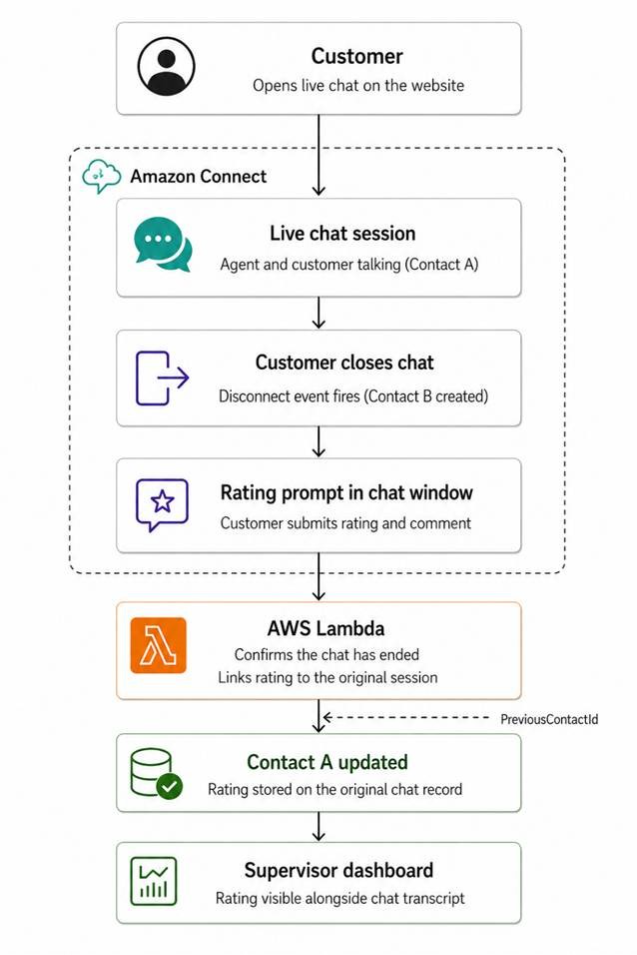
Architecture Diagram
Preview
Implementation Steps
 
The solution leverages standard contact center workflows and event-driven processing to automate customer feedback collection and reporting.
  1. Chat completion triggers the post-chat survey workflow.
  2. Customer feedback is captured after survey submission.
  3. AWS Lambda processes the CSAT response.
  4. Rating, score, and comments are stored in Contact Attributes.
  5. Required attributes are updated in Contact Search for reporting visibility.

 
Scale Your Success with Confidence
 
P3Fusion is audited and certified by industry-leading third-party standards.