
We use essential cookies to make our site work. With your consent, we may also use non-essential cookies to improve user experience and analyze website traffic. By clicking “Accept,” you agree to our website's cookie use as described in our Cookie Policy. You can change your cookie settings at any time by clicking “Preferences.”
 
 
The Hidden Risk of Contact Center Case Migration


Overview
 
Many organizations moving from legacy contact center solutions to Amazon Connect face a significant challenge: Amazon Connect provides migration capabilities for customer profiles and contact data, but not for active customer cases. At the time of migration, thousands of this client's customer cases were still open and actively managed by support teams — containing critical interactions, escalations, ownership details, and service history that could not simply be left behind.
 
Industry
 
Customer Service, Contact Centers
 
What the Client Asked For
 
"We want all our active customer cases migrated to Amazon Connect without disrupting our day-to-day operations. During the transition period, we also need the flexibility to continue using our existing case management system while keeping case information synchronized across both platforms."
 
Migrating Cases Without Interrupting Customer Service
 
Active Cases Could Not Be Migrated Natively
 
Amazon Connect did not provide a native capability to migrate active customer cases from the existing system.
The Legacy Platform Needed to Remain Operational
 
The client wanted a stabilization period after go-live and required both systems to remain synchronized throughout the transition period.
 
Requirements: Migrate active cases automatically · Avoid duplicate records · Maintain data consistency · Bidirectional synchronization
 
 
Solution
 
The solution automatically synchronizes case creations and updates between Amazon Connect and the legacy platform.
 
• Step 1 — Discover and Extract Active Cases:
The migration framework retrieves active and open cases from the customer's existing case management system, including customer details, status, priority, ownership, and notes.
 
• Step 2 — Transform and Migrate Data:
Extracted case data is transformed into a format compatible with Amazon Connect Cases, which automatically creates corresponding cases while maintaining reference mappings between both systems.
 
• Step 3 — Enable Bidirectional Synchronization:
A synchronization engine continuously monitors both platforms for case creation and updates. Any change made in one system is automatically replicated to the other.
 
• Step 4 — Maintain Operational Continuity:
Both systems remain synchronized throughout the stabilization period, allowing agents to work from either platform as a safe fallback while confidence in Amazon Connect grows.
 
Scenario A — Case Created in Amazon Connect: A new case is automatically created in the legacy platform.
 
Scenario B — Case Updated in Legacy Platform: Updates are automatically synchronized back to Amazon Connect.
 
 
Before vs. After — The Operational Difference
 
Without This Solution
 
Active cases remained in the legacy platform, and agents had to manually recreate or manage cases across multiple systems — increasing effort and creating opportunities for data inconsistencies. Organizations had to choose between fully moving to Amazon Connect or continuing to operate in the legacy platform, so any production issue created significant operational risk.
With This Solution
 
Active cases are automatically migrated into Amazon Connect with all required information preserved. Case creations and updates are synchronized between both platforms in near real time, and both platforms can operate simultaneously during the stabilization period as a safe fallback.
 
Results
 
100% Active Cases Successfully Migrated
Real-Time Bidirectional Synchronization
Reduced Migration Risk
Improved Agent Productivity
Full Business Continuity
 
Key Learnings
 
Business Continuity Is Critical During Migration
 
A successful contact center migration requires more than moving data — organizations must ensure ongoing customer operations remain uninterrupted throughout the transition.
Real-Time Synchronization Prevents Data Inconsistencies
 
Keeping both systems synchronized ensures agents always work with accurate and up-to-date case information.
Automation Improves Efficiency
 
Automating case migration and synchronization eliminates manual effort, reduces errors, and improves operational productivity.
Fallback Strategies Increase Adoption Confidence
 
Custom integrations can extend native Amazon Connect capabilities and address complex business requirements during migration projects.
 
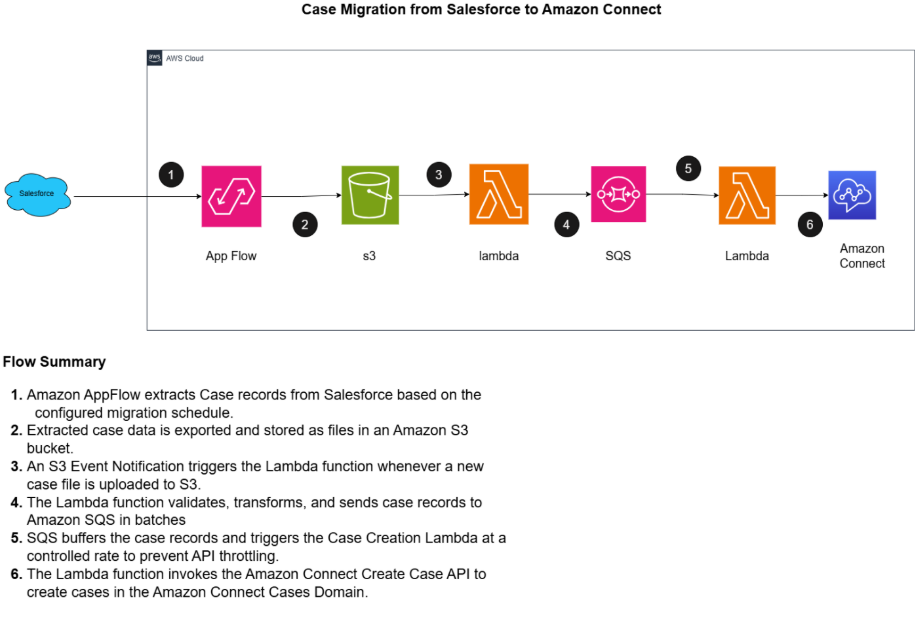
Case Migration Architecture
 
AppFlow extracts cases from Salesforce → S3 → Lambda validates and batches → SQS → Lambda invokes the Amazon Connect Create Case API.
 
 
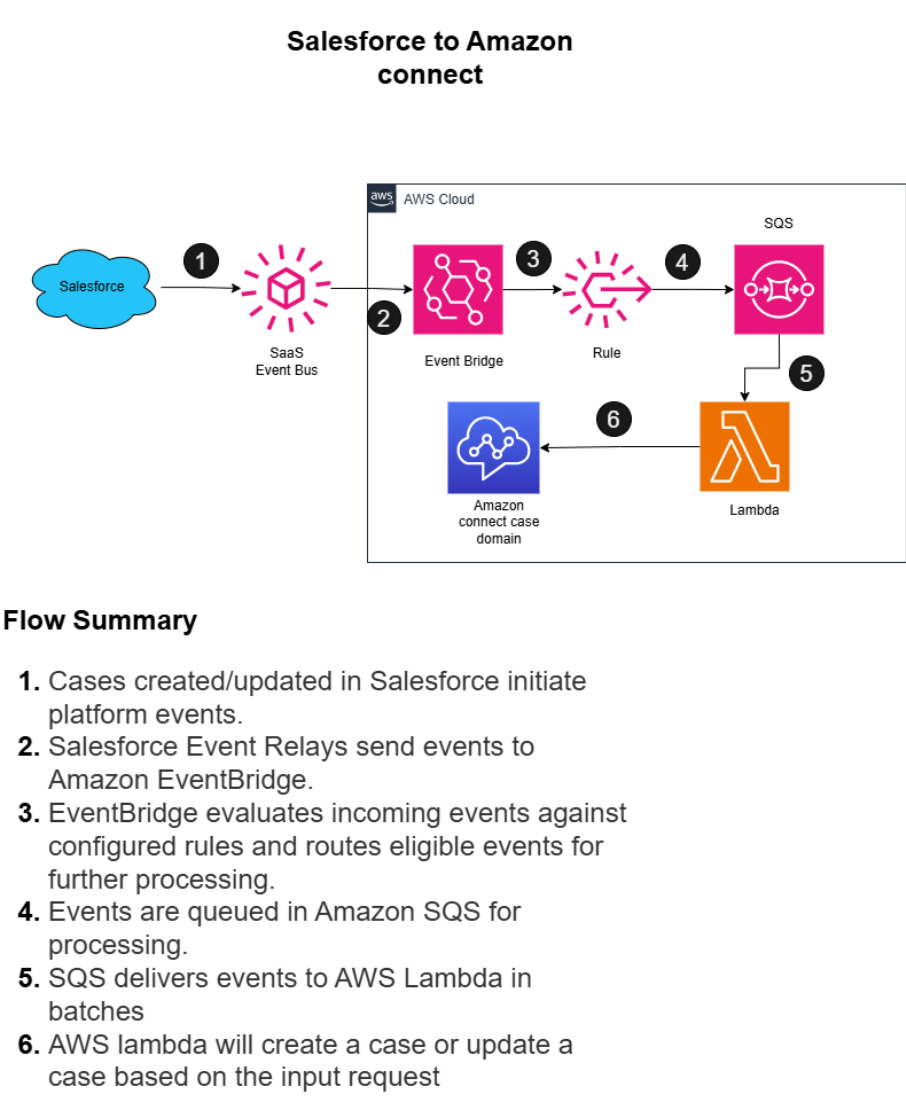
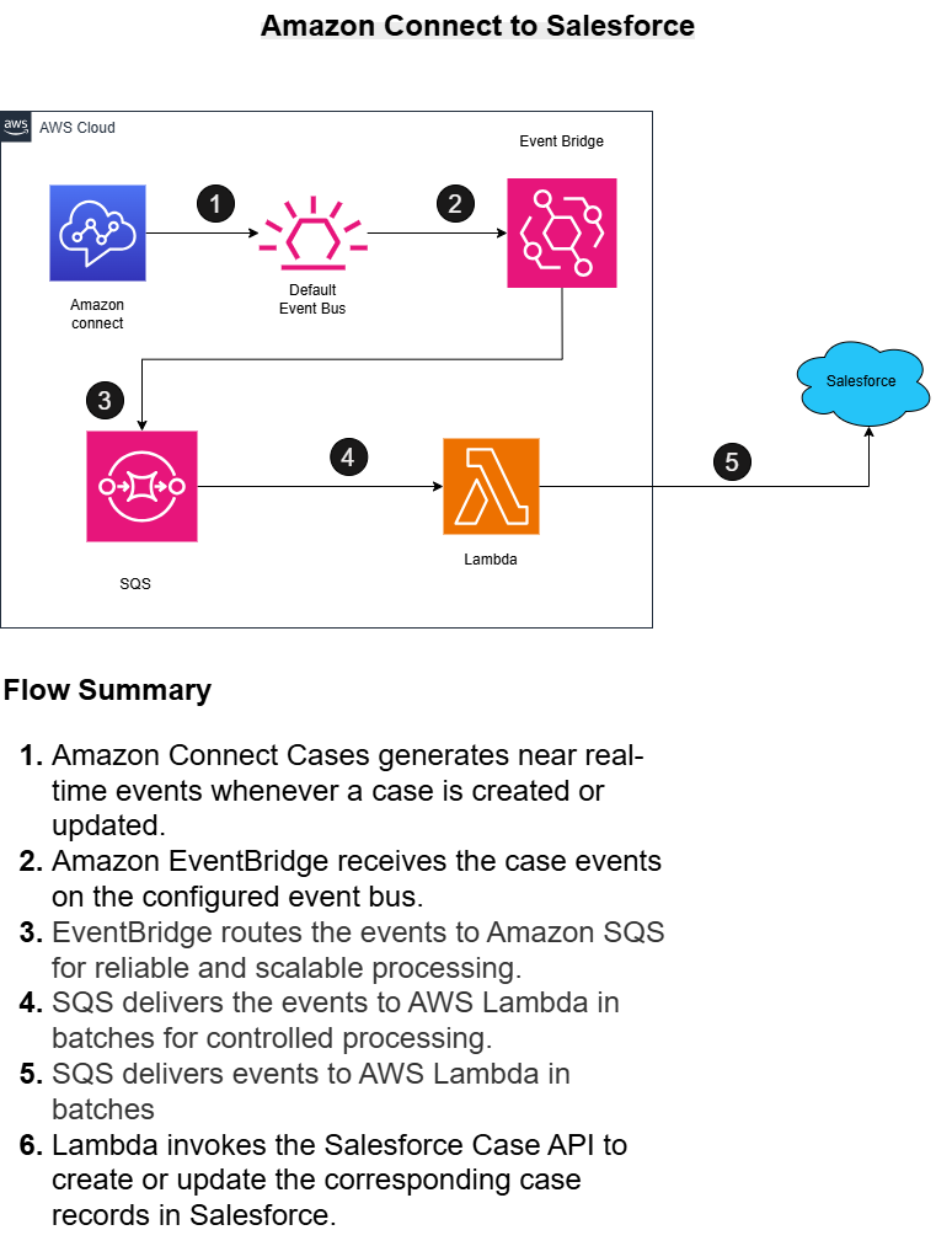
Bidirectional Case Sync Architecture
 
Salesforce to Amazon Connect: platform events → EventBridge → SQS → Lambda creates or updates the case in Amazon Connect.
 
 
Amazon Connect to Salesforce: case events → EventBridge → SQS → Lambda invokes the Salesforce Case API to create or update the corresponding record.
 
 
Conclusion
 
A successful contact center migration is measured not just by what moves, but by what never breaks along the way. By combining automated case migration with real-time bidirectional synchronization, P3Fusion gave this client zero disruption, full continuity, and confidence in every case.
 
Scale Your Success with Confidence
 
P3Fusion is audited and certified by industry-leading third-party standards.