

We use essential cookies to make our site work. With your consent, we may also use non-essential cookies to improve user experience and analyze website traffic. By clicking “Accept,” you agree to our website's cookie use as described in our Cookie Policy. You can change your cookie settings at any time by clicking “Preferences.”
 
 
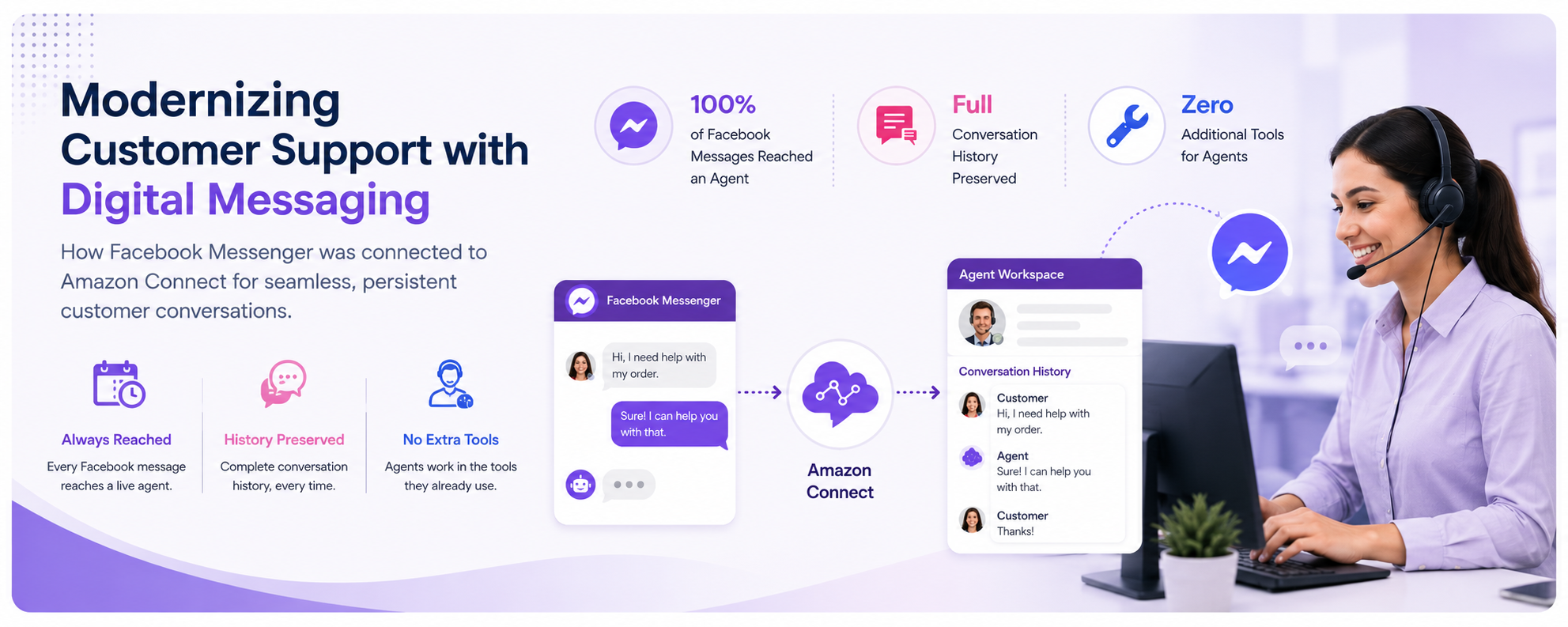
Modernizing Customer Support with Digital Messaging
100% of Facebook Messages Reached an Agent
Full Conversation History Preserved
Zero Additional Tools for Agents


Overview
 
Today's customers no longer adapt to a company's preferred communication channels—they expect businesses to engage with them on the platforms they already use. For millions of people, Facebook Messenger has become one of those primary channels. It is where they connect with friends and family, discover brands, and increasingly, where they expect to receive fast, convenient customer support.
 
Organizations that continue to rely solely on traditional channels such as phone and email risk creating a disconnect between customer expectations and service delivery. Customers may reach out through Facebook Messenger only to receive delayed responses or no response at all, forcing them to switch channels and repeat their issue. Without real-time engagement, interactions become fragmented, response times increase, and the overall customer experience suffers. Over time, these disconnected interactions can reduce customer satisfaction, weaken brand trust, and increase the likelihood of customers turning to competitors that offer seamless omnichannel support.
 
The Challenge
 
Left unaddressed, this gap produces measurable consequences including delayed responses, disconnected conversations, no conversation continuity, lost enquiries, and an inconsistent customer experience. The opportunity is clear: organizations that extend their contact center capabilities to social messaging channels can respond faster, build stronger relationships, and serve customers in the way those customers prefer. The question is how to do it without disrupting existing operations or requiring agents to work across disconnected systems.
 
Key Challenges
 
Delayed Responses
 
Messages sent through Facebook are often not visible to customer support teams in real time, leaving customers waiting hours—or even days—for a response. This delay creates frustration, interrupts the flow of conversation, and diminishes the responsive, personalized experience customers expect from modern businesses.
Disconnected Conversations
 
Without real-time messaging capabilities, agents cannot engage customers in a live conversation to ask follow-up questions or resolve issues efficiently. Each response introduces additional delays, turning what could be a quick interaction into a prolonged exchange that slows issue resolution and negatively impacts customer satisfaction.
No Conversation Continuity
 
When customers reconnect after an earlier conversation, agents have no visibility into previous discussions or actions taken. Without conversation history, customers are required to repeat their issue and provide the same information again, leading to longer resolution times, duplicated effort, and an inconsistent support experience.
Lost Enquiries
 
Messages received outside business hours or during periods of high support volume are at risk of being overlooked. Without an automated process to capture and route these inquiries, businesses may miss customer requests entirely, resulting in delayed responses and reduced customer satisfaction.
Inconsistent Customer Experience
 
When customers receive fast, responsive support through one channel but encounter silence on another, the inconsistency becomes highly visible. Over time, these uneven experiences erode trust, damage brand perception, and increase the likelihood that customers will seek support from competitors that provide a seamless omnichannel experience.
 
How the Solution Works — In Plain Terms
 
Implemented a seamless integration between its customer messaging channels and existing contact center platform, allowing customer conversations to be managed through a single support interface. Incoming messages are automatically routed into the contact center, where they are treated like any other customer interaction, eliminating the need for agents to monitor multiple applications.
 
Agents continue using their existing workflows, tools, and processes without additional training or changes to their daily operations. Behind the scenes, the integration handles message synchronization, routing, and conversation management, ensuring that customers receive timely responses regardless of the channel they choose.
 
The solution also preserves conversation history, enabling agents to view previous interactions and continue conversations with full context. Messages received outside business hours or during periods of high demand are automatically captured and queued for follow-up, preventing customer inquiries from being overlooked.
 
By unifying customer messaging channels with the contact center, the organization delivers a consistent omnichannel support experience, improves agent productivity, reduces response times, and strengthens customer satisfaction without disrupting existing operations.
 
 
Solution Workflow
 
The solution provides a seamless customer messaging experience by integrating digital messaging channels with the organization's contact center platform. From the moment a customer sends a message to the completion of the interaction, the entire process is automated.
 
• 1. Customer initiates a conversation:
The customer sends a message through their preferred messaging channel using the business's official account. No additional applications, registrations, or manual steps are required. making it easy for customers to reach support.
 
• 2. The conversation is automatically captured:
The incoming message is received by the integration layer, which automatically creates a new customer interaction within the contact center platform. Customer identity and conversation details are securely associated with the interaction, enabling agents to manage it alongside other support requests.
 
• 3. Previous conversation history is retrieved:
If the customer has contacted the organization before, the solution automatically retrieves previous conversation history and makes it available to the assigned agent. This provides the necessary context from the start, eliminating the need for customers to repeat previously shared information.
 
• 4. The interaction is routed to the appropriate agent:
The new interaction is intelligently routed to the appropriate queue or agent based on the organization's routing rules. Agents receive the conversation within their existing workspace and respond using the same tools and workflows they use for other customer interactions.
 
• 5. Real-time conversations are maintained across channels:
Messages exchanged between the customer and agent are synchronized in real time, creating a seamless, two-way conversation. Customers continue communicating through their preferred messaging channel, while agents manage the interaction entirely from the contact center platform.
 
• 6. Conversation records are securely retained:
When the interaction is complete, the active session is closed while the conversation history is securely preserved. Future interactions automatically include the customer's previous conversation history, enabling agents to provide faster, more personalized, and context-aware support without requiring customers to start over.
 
 
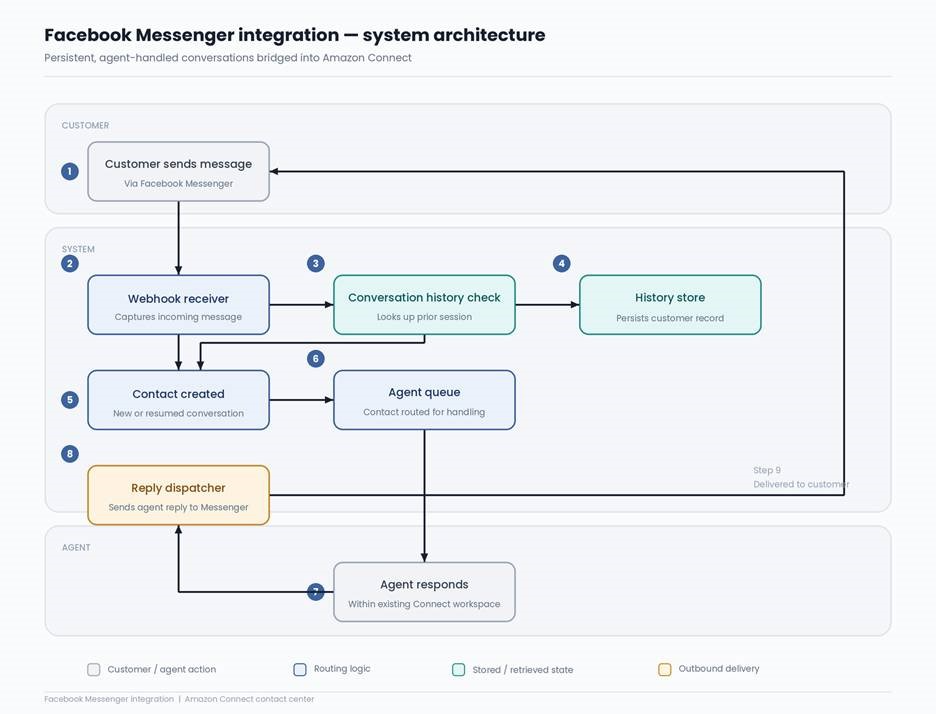
Architecture Workflow
 
Architecture Diagram
Preview
 
Flow Summary
 
Step 1
Facebook Webhook Receiver

A secure endpoint that receives incoming messages the moment a customer sends one through Facebook Messenger. It verifies the request, extracts the customer's identity, and passes it forward for processing.

Step 2
Conversation History Service

Checks whether the customer has messaged before by looking up their Facebook ID in the history store. If found, it retrieves the last contact reference to link the new conversation.

Step 3
AWS Lambda Orchestrator

A Lambda function orchestrates the incoming-message flow—validating the webhook, checking history, starting a new chat contact in Amazon Connect, and establishing the connection without requiring a dedicated server.

Step 4
Amazon Connect Chat Contact

Once the history check is complete, a new chat contact is created in Amazon Connect, optionally rehydrated with the customer's past conversation, and placed into the agent's queue.

Step 5
Active Session Store (DynamoDB)

Holds the live connection details (contact ID, participant token) for the duration of the conversation. Allows incoming messages to be matched to an open chat session instead of starting a new one.

Step 6
Conversation History Store (DynamoDB)

A separate, longer-lived table retains the customer's most recent contact ID even after the chat ends. This allows future conversations to be reconnected to the customer's prior history.

Step 7
Event Notifications (Amazon SNS)

Amazon Connect streams real-time chat events to SNS, which triggers the appropriate response: forwarding agent messages to Facebook, updating history, or cleaning up when a chat ends.

Step 8
Facebook Messenger Delivery

When an agent replies inside Amazon Connect, this component securely sends that reply back to the customer's Facebook Messenger inbox using the Facebook Graph API in real time.


 
Key Learnings
 
Customer support must exist on the channels customers prefer, not just the channels the business finds convenient
 
A phone line and an email address are no longer sufficient on their own. Customers who prefer messaging expect to be able to get help that way. Organizations that extend support to those channels do not just add a feature — they remove a barrier that was quietly costing them customers.
Conversation history is not a nice-to-have — it is a fundamental part of good service
 
Asking a returning customer to explain their situation from scratch signals that the business does not know them. Persistent conversation history removes that friction entirely. It makes the customer feel valued and makes the agent's job easier at the same time.
New channels should integrate into existing workflows, not create new ones
 
The reason many social messaging integrations fail to stick is that they require agents to work in yet another separate system. By routing Facebook Messenger contacts directly into Amazon Connect, agents handled them the same way they handled any other contact. There was no learning curve, no additional overhead, and no divided attention.
Automation enables scale without sacrificing quality
 
The entire process — receiving a message, creating a contact, loading conversation history, connecting an agent, delivering a response — happens automatically. The agent simply focuses on helping the customer. Everything else runs in the background. That is what allows the solution to scale as message volume grows, without requiring additional manual effort.
 
 
Scale Your Success with Confidence
 
P3Fusion is audited and certified by industry-leading third-party standards.