

We use essential cookies to make our site work. With your consent, we may also use non-essential cookies to improve user experience and analyze website traffic. By clicking “Accept,” you agree to our website's cookie use as described in our Cookie Policy and Privacy Policy. You can change your cookie settings at any time by clicking “Preferences.”
 
 
Internal Peer-to-Peer Chat in Amazon Connect
Direct Peer-to-Peer & Queue Messaging
Zero Customer Conferencing for Internal Escalations
Faster Guidance from Supervisors & Experts


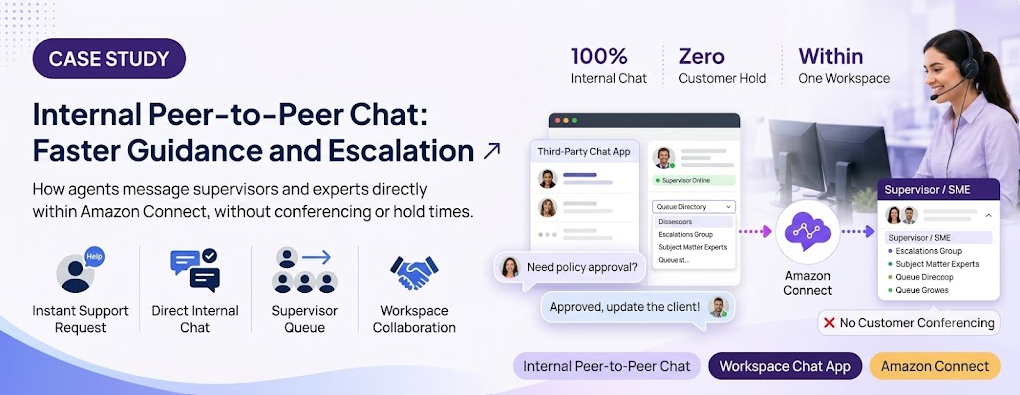
Case Study · Internal Peer-to-Peer Chat
Faster Guidance and Escalation Between Agents, Supervisors and Experts, Without Conferencing the Customer
 
Contact center agents rarely work alone. A policy question, an unusual request or a decision that needs approval often calls for a quick word with a supervisor or a subject matter expert (SME). The faster that word happens, the better the outcome for the customer.
 
Our solution embeds a specialized third-party chat application directly inside the Amazon Connect agent workspace. Agents can now message colleagues and queues with zero tool switching, without ever putting customers on hold or conferencing them unnecessarily.
 
CORE OPERATIONAL SHIFT
"Asking a colleague for guidance should never mean pulling the customer into an internal discussion. With peer-to-peer chat right in the workspace, help arrives in real time with zero customer disruption."
 
The Challenge
 
Contact center agents rarely work alone. A policy question, an unusual request or a decision that needs approval often calls for a quick word with a supervisor or a subject matter expert (SME). The faster that word happens, the better the outcome for the customer.
When asking for help depends on an active customer interaction, such as conferencing someone into a call, the options are poor. The customer waits, gets caught in the middle, or the agent gives up and guesses. Below are five of the most common consequences.
#Impact AreaWhat It Costs the Business
1Escalation needs a customer contactWithout a live interaction to conference into, agents had no simple way to ask a colleague a question.
2Conferencing customers unnecessarilyAgents pull supervisors or SMEs onto the line just to ask a question, which puts the customer on hold or in the middle.
3Slower answersAgents hunt for the right person through other channels, so guidance arrives late or not at all.
4Knowledge stays with a few peopleSubject matter experts cannot be reached quickly or consistently, so the same questions go to the same few people.
5Escalations with no recordQuestions asked in side channels are not tied to the contact center workflow, so supervisors have little visibility.
 
The Client
 
Our client runs a contact center on Amazon Connect, with agents, supervisors and SMEs spread across teams and queues. Agents regularly need guidance and sometimes need to escalate, and the business wanted that to happen without disrupting the customer.
 
Problem 1
 
No way to message colleagues without a customer contact
 
Collaboration depended on live interaction. Without one, agents had no built-in way to reach other agents, supervisors, or SMEs.
Problem 2
 
Asking for help affected the customer
 
Bringing a colleague in meant conferencing them into the contact, which put the customer on hold or in the middle of an internal discussion.
 
 
What They Asked For
“Our agents often just need a quick answer from a supervisor or an expert. Today that means conferencing someone into a customer call, or hunting for them elsewhere. We want agents to be able to message colleagues and queues directly from the workspace, with no customer involved, so help is faster and the customer is not in the middle.”
— Head of Contact Centre Operations
 
How It Works
 
The solution adds a third-party chat app that runs inside the Amazon Connect agent workspace. The agent selects who to message from a single list of people and queues, and the message is delivered internally, with no customer involved.
 
Step 1
Need for Guidance or Escalation

An agent needs guidance or wants to escalate something, for example a policy question, a complex request, or a decision that needs approval. This can happen during contact or between contacts.

Step 2
Workspace Chat Integration

The agent opens the third-party chat app, which runs inside the Amazon Connect agent's workspace, so there is no need to switch tools.

Step 3
Unified People & Queue Directory

The app lists the people and queues the agent can reach: other agents, supervisors, and subject matter experts, and the queues they belong to.

Step 4
Direct or Queue Selection

The agent selects who to message. This can be a specific person, or a queue so that the next available person can pick it up.

Step 5
Internal Delivery Without Customer

The agent writes the message and sends it. It is delivered as an internal chat message in the recipient’s workspace, with no customer interaction involved.

Step 6
Guidance Delivered & Continuation

The recipient replies with guidance. The agent carries on with the answer in hand, and no customer is conferenced or transferred along the way.
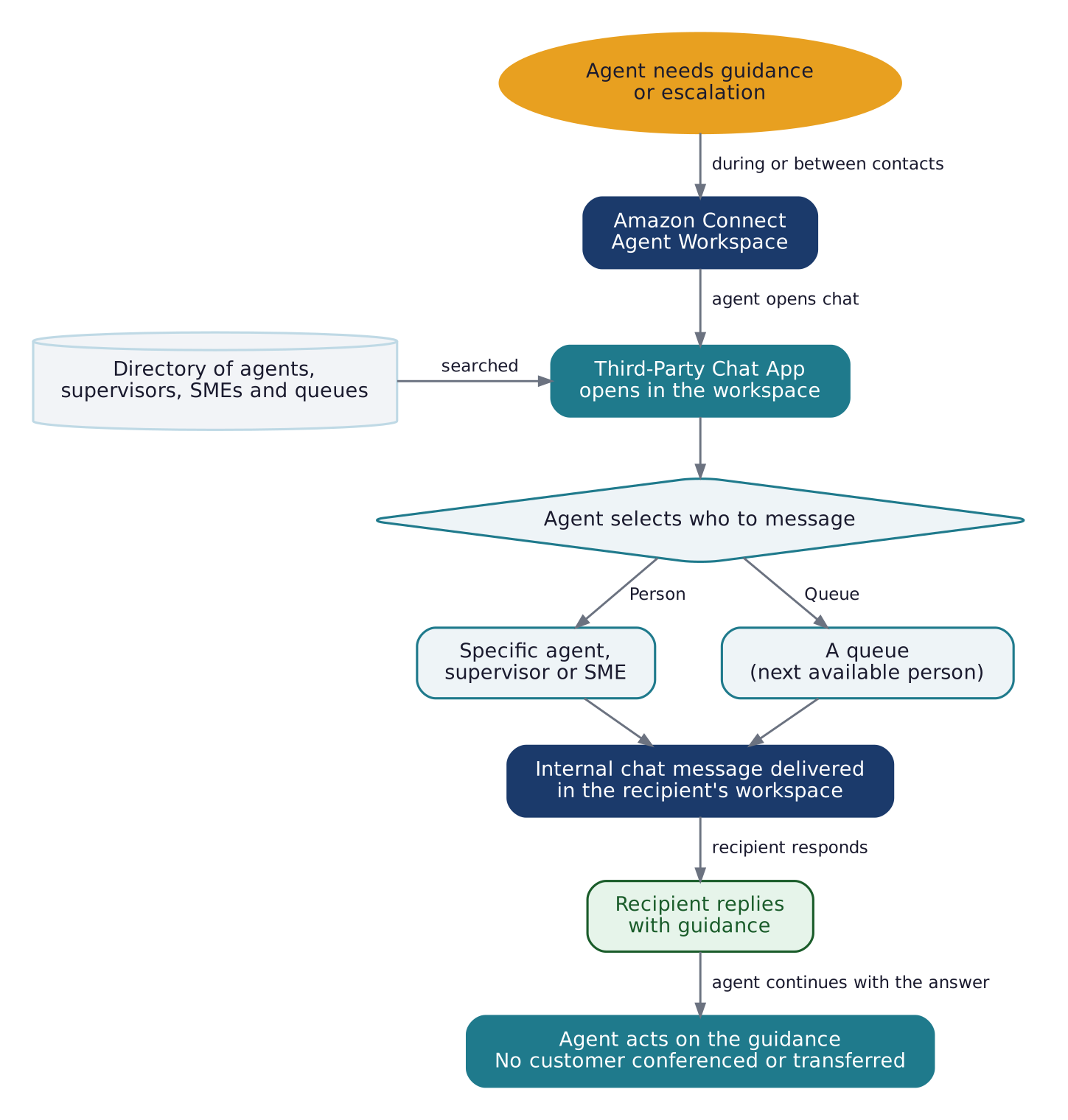
 
Solution Architecture
 
The diagram below shows the flow from the agent’s need for guidance, through selecting a person or queue in the app, to the reply and the agent carrying on.
 
Internal Peer-to-Peer Chat Architecture Flow Diagram
Preview
Architecture Flow & Components
 
  1. Amazon Connect Workspace: Interaction originates natively in the agent desktop without tool-switching.
  2. Embedded Chat App: In-workspace messaging launches instantly during or between customer contacts.
  3. Unified Directory: Searchable directory showing live availability of peers, supervisors, SMEs, and queues.
  4. Direct & Queue Routing: Send directly to a chosen expert or dispatch to a queue for the next available agent.
  5. Private Delivery & Resolution: Message is delivered internally, enabling swift resolution with zero customer holds, conferences, or transfers.
 
Practical Examples
 
Two agents at the same company, on the same day, each need help. Neither one conferences a customer.
 
SCENARIO A
 
Agent Asks an Expert
 
Situation:
Mid-call, a customer asks about a complex product exemption.
What happens:
  • Agent opens the chat app in the workspace
  • Selects a subject matter expert from the list
  • Sends a short question
  • Expert replies in under a minute, and the agent answers the customer
✓ The customer is never conferenced, and the expert is not pulled onto the call.
SCENARIO B
 
Agent Messages a Queue
 
Situation:
Between contacts, an agent needs approval for a goodwill gesture.
What happens:
  • Agent opens the chat app
  • Selects the supervisor's queue
  • Sends the request
  • The next available supervisor replies with approval
✓ The request reaches whoever is free, so the agent is not waiting on one person.
 
"In both cases, the agent got an answer in the workspace, from the right person, without involving the customer in the discussion."
Before vs. After
 
How peer-to-peer chat transforms day-to-day operations across key contact center touchpoints.
 
AreaBeforeAfterImpact
Asking for helpAgents conferenced others into the customer's contact or searched for them in separate tools.Agents message the right person or queue directly from the workspace.Zero tool switching
Customer experienceCustomers were put on hold or left in the middle of an internal discussion.Internal questions are handled in chat, and the customer is not conferenced.Uninterrupted customer flow
Reaching expertsExperts were found by luck, or through the same few contacts.Agents, supervisors, and SMEs are all reachable from one list, and queues spread over the load.Balanced team knowledge
Collaboration without a contactAn active customer interaction was needed to bring colleagues together.Agents can collaborate at any time, with or without live contact.Always-on team support
 
Results
 
Following the introduction of internal peer-to-peer chat, the client gained five clear operational improvements.
 
💬
Direct Messaging
Between agents, supervisors and SMEs
🚫
No Conferencing
No customer conferencing needed for internal questions
⚡
Faster Guidance
For agents, accessible from one unified list
🔄
Queue Messaging
Next available person responds without bottlenecks
⏰
Anytime Collaboration
With or without an active live customer contact
 
Key Learnings
 
Delivering this solution produced four core insights about internal collaboration in the contact center.
 
01
Keep the customer out of the conversation
 
Asking a colleague should not mean putting the customer on hold or in a conference. Internal chat moves the question without touching the contact.
02
Make experts easy to reach
 
A single list of agents, supervisors and SMEs removes the guesswork over who to ask and who is available.
03
Let queues share the load
 
Messaging a queue means the next available person answers, so no one expert becomes a bottleneck.
04
Put collaboration inside the workspace
 
Because the app runs within the Amazon Connect workspace, agents get help without leaving the tool they already use.
 
 
Amazon Connect Solutions
Want to Build Something Similar?
This solution adds a third-party chat app inside the Amazon Connect agent workspace, so agents can message colleagues and queues directly. If your team wants faster guidance and escalation without conferencing the customer, reach out to discuss how a similar approach could work for your operation.
 
✓
Integrated in Agent Workspace
Embedded directly into Amazon Connect with zero context switching.
✓
Direct & Queue Escalation
Message specific individuals or entire subject matter queues.
✓
Frictionless Customer Experience
Resolve complex questions without hold time or unwanted conferences.
 
Scale Your Success with Confidence
 
P3Fusion is audited and certified by industry-leading third-party standards.