
We use essential cookies to make our site work. With your consent, we may also use non-essential cookies to improve user experience and analyze website traffic. By clicking “Accept,” you agree to our website's cookie use as described in our Cookie Policy and Privacy Policy. You can change your cookie settings at any time by clicking “Preferences.”
 
 
Preview Dialer in Amazon Connect
 
Amazon Connect Outbound Innovation
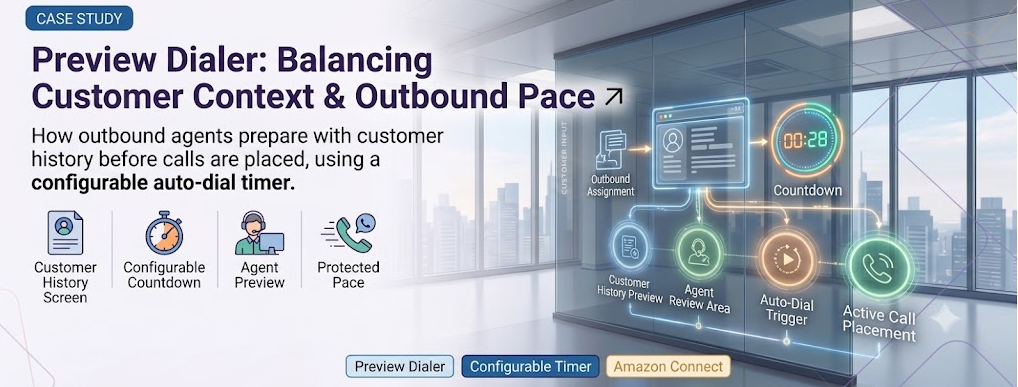
Preview Dialer
Preparing outbound agents with customer context and a configurable auto-dial timer on Amazon Connect.
Context-First
Customer History on Screen
Configurable
Auto-Dial Timer Setting
Dual Mode
Manual Dial or Auto-Trigger
Zero Wait
Delivered Ahead of Native Release
 
 
icon
Instant Customer Context Ahead of Every Call
icon
Configurable Countdown Safeguard Timer
icon
Seamless Extension for Amazon Connect Workspace
icon
Consistent Pacing for Sales & Care Campaigns
 
The Challenge
 
Outbound calling is different from inbound. The agent chooses when the conversation starts, which means they can prepare for it. A few seconds spent on the customer’s history can change a sales call from a cold pitch into a relevant offer, or a care follow-up from a repeat of past frustration into a real resolution.
But that preparation has a cost. If the call waits on the agent alone, pace drops and outbound efficiency suffers. Below are five of the most common consequences of getting the balance wrong.
#Impact AreaWhat It Costs the Business
1Calls placed without preparationAgents dial cold, without having seen the customer’s history, so conversations start with questions the business already has answers to.
2Weaker sales and care conversationsWithout context, agents miss upsell openings, repeat past mistakes, and sound less informed to the customer.
3Idle time between callsIf dialing depends only on the agent, some wait too long before starting the call, and outbound productivity falls.
4Inconsistent pacing across the teamSome agents rush and some linger, so call volumes vary from agent to agent and are hard to forecast.
5Missing platform capabilityNative preview dialing was not yet available in Amazon Connect, leaving teams to choose between speed and preparation.
 
The Client
 
Our client runs outbound sales and care teams on Amazon Connect. Agents call customers for renewals, offers, and follow-ups, and need to know who they are calling before the call is placed.
 
Two needs stood out:
 
Problem 1
No structured way to review the customer before dialing
Agents had no consistent preview of customer history and context ahead of the call, so preparation depended on individual habits.
Problem 2
No safeguard for outbound pace
When the call relied on the agent starting it, some waited too long, and there was no way to balance preparation against efficiency.
 
What They Asked For
 
“
“Our outbound agents need a moment to look at the customer before they call, whether that is a sales opportunity or a care follow-up. But we cannot let that moment run on. We want the agent to see the history first, then have the call placed automatically after a set time if they have not started it themselves.”
— Head of Contact Centre Operations
 
How It Works
 
The solution adds a preview step to the outbound flow using a browser extension that works alongside the Amazon Connect agent workspace. It was delivered before the native Amazon Connect preview dialing was released, giving the teams the capability without waiting.
 
Step 1
Outbound Contact Assigned

An outbound contact is assigned to an agent from a sales or care campaign and arrives in the Amazon Connect agent workspace in a preview state, before any call is placed.

Step 2
Customer History Loaded

The browser extension, running alongside the workspace, shows the preview screen with the customer’s history and context, such as past interactions, account details, and campaign notes.

Step 3
Configurable Timer Starts

The countdown timer starts. The length of the timer is configurable, so each team can set the balance between preparation time and outbound pace.

Step 4
Agent Manual Dial

The agent reviews the customer and, once ready, clicks Dial to place the call manually. This is the preferred route, and the agent stays in control.

Step 5
Automatic Timer Dial Trigger

If the agent has not started the call when the timer ends, the extension triggers the dial automatically, so the outbound pace is protected.

Step 6
Call Handled & Logged

The call is placed through Amazon Connect and handled as normal. The outcome and disposition are recorded for reporting and campaign analytics.
 
Solution Architecture
 
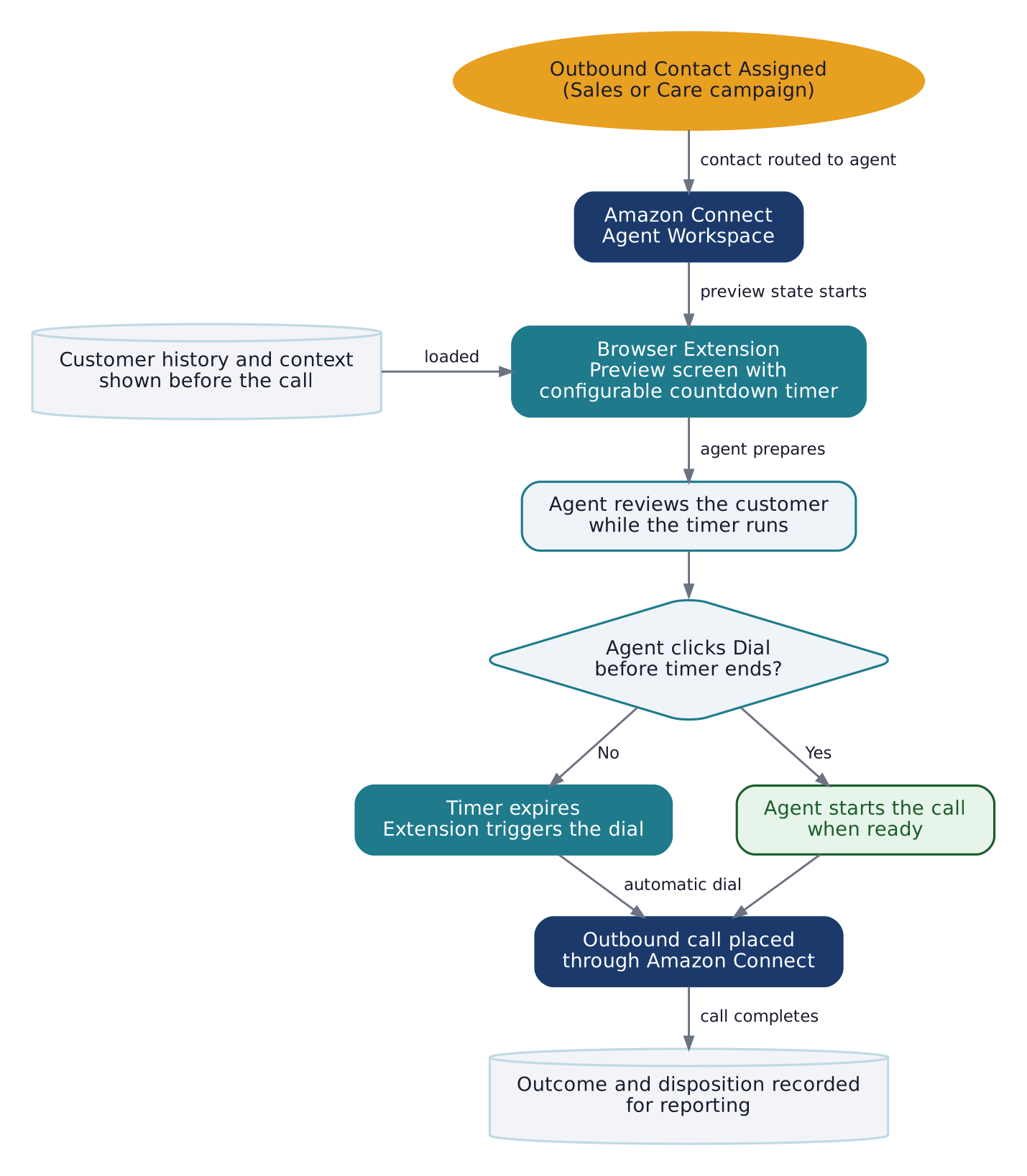
The diagram below shows the flow from the outbound contact being assigned, through the preview and the timer, to the call being placed either by the agent or automatically.
 
Preview Dialer Solution Architecture Flow Diagram
Preview
Architecture Flow & Components
 
  1. Outbound Contact Routing: Contacts from sales or care campaigns are routed into the Amazon Connect agent workspace in an initial preview state.
  2. Workspace Browser Extension: Working seamlessly inside the agent workspace, the extension surfaces relevant customer history, account notes, and campaign details.
  3. Configurable Countdown Safeguard: A visual countdown timer starts immediately, tailored to the specific preparation needs of each campaign team.
  4. Dual Dial Trigger: Agents retain control to click Dial manually as soon as they are ready, while an automatic trigger initiates the call if the timer expires.
  5. Amazon Connect Execution & Reporting: The outbound call is placed through Amazon Connect telephony with complete disposition and outcome metrics logged for reporting.
 
Practical Examples
 
Two agents at the same company, on the same day, each preparing for an outbound call. The timer is set to 30 seconds for both.
 
Agent A — Outbound Sales
Manual Dial
Situation:Renewal campaign call, preview timer set to 30 seconds.
What Happens:
  • Preview shows the customer’s plan and past orders
  • Agent spots an upgrade opening
  • Clicks Dial after 20 seconds
  • Call starts with a tailored opening
Outcome: Agent A used the preview well, and the call was placed on their own terms.
Agent B — Customer Care
Pacing Safeguard
Situation:Follow-up call on an open complaint, preview timer set to 30 seconds.
What Happens:
  • Preview shows the complaint history
  • Agent is finishing notes from the last call
  • Timer ends and the dial triggers automatically
  • Call is placed without delay
Outcome: Agent B’s pace was protected, and the call still started with context on screen.
 
Both agents had the customer’s context on screen before the call. One started the call on their own terms, and the other was kept on pace by the timer.
 
Before vs. After
 
The difference structured preview dialing makes to outbound preparation, pacing consistency, and operational performance.
 
Operational AreaBefore (Static Manual Pacing)After (Preview Dialer Extension)Impact
Preparing for the call
✕Agents dialed with little or no view of the customer or opened other systems on their own initiative.
✓Customer history and context appear in a preview screen before the call is placed.
Context-Rich Conversations
Control of dial timing
✕Dialing depended entirely on the agent, so pace varied from person to person.
✓A configurable timer triggers the dial automatically if the agent has not started the call.
Pacing Safeguard
Balance of preparation & pace
✕Teams had to choose between preparing and keeping outbound moving.
✓Agents get time to prepare, and the timer keeps outbound efficient.
Productivity & Quality
Platform capability
✕Native preview dialing was not yet available on Amazon Connect.
✓A browser extension delivered preview dialing ahead of the native release.
Immediate Innovation
 
Key Results
 
Following the introduction of the preview dialer, the client gained five clear operational improvements.
 
Full Context
Customer History
Preview of customer context before every outbound call.
Pacing
Timed Auto-Dial
Timed automatic dial when the agent does not start the call.
Customizable
Configurable Timer
Each team sets its own balance of prep time and outbound rhythm.
Better Quality
Prepared Conversations
Better prepared calls for both sales and customer care teams.
Early Value
Rapid Delivery
Delivered via browser extension ahead of native Connect release.
 
Key Learnings
 
Delivering this solution produced four insights about balancing preparation and pace in outbound calling.
 
Preparation and pace can coexist
 
A short, timed preview gives agents context without letting the outbound rhythm slip. Neither must be sacrificed for the other.
Keep the agent in control by default
 
Making the manual Dial the normal route, and the timer the safety net, respects the agent while protecting outbound efficiency.
Make the timer configurable
 
Sales and care teams work differently. A configurable timer lets each team find its own balance without changing the solution.
An extension can bridge a platform gap
 
A browser extension delivered preview dialing on top of Amazon Connect before the native feature was available, so the teams did not have to wait.
 
Want to Build Something Similar?
Ready to Empower Outbound Agents with Context & Controlled Pacing?
This solution used a browser extension on top of Amazon Connect to deliver a preview dialer with a configurable timer. If your outbound teams want time to prepare without losing pace, reach out to discuss how a similar approach could work for your operation.
✓
Instant Customer Context
Relevant interaction history prior to dial
✓
Pacing Safeguard
Configurable automatic countdown dialer
✓
Zero Platform Delays
Lightweight extension for Amazon Connect
 
Scale Your Success with Confidence
 
P3Fusion is audited and certified by industry-leading third-party standards.