



A customer calls or starts a chat, and the interaction enters the Amazon Connect contact flow (IVR).
The contact flow invokes an AWS Lambda function, passing interaction details including channel, queue, and customer or menu selections.
The Lambda function evaluates configured business rules to decide whether a case should be created and exactly what it should contain.
Where a case is required, Lambda calls the Salesforce / SCP APIs to instantiate the case record automatically, requiring zero agent effort.
The newly generated Case ID and direct hyperlink return to the contact flow, stored as contact attributes that travel with the interaction.
When routed to an agent, the Amazon Connect View displays the case hyperlink. One click opens the case in Salesforce, also visible to supervisors.
Agent A (Phone Call): Starts the conversation with the case already in place and zero time lost to data entry or record creation. Agent B (Web Chat): Works from the same standard case, created identically for every chat interaction. Supervisors: Access the exact same direct hyperlink to review the interaction alongside the CRM record.
- Case created in Salesforce before call answered
- Direct case hyperlink displays in agent’s View
- Agent opens case with one click and appends notes
- Case created automatically as chat connects
- Case link shown in Amazon Connect workspace
- Case permanently tied to chat session context
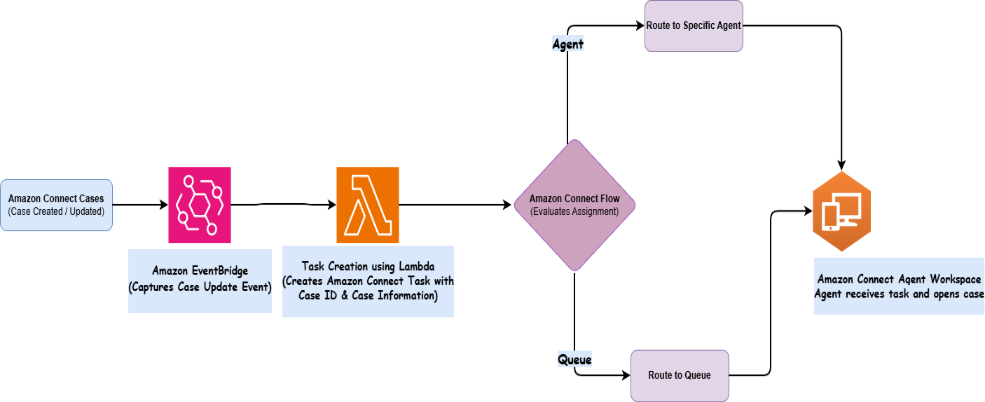
- Inbound Contact Layer: Voice and chat sessions enter Amazon Connect contact flows where IVR menus capture initial customer intent.
- Business Rules Engine: AWS Lambda applies programmatic validation to identify if interaction criteria mandate a new Salesforce case.
- CRM API Integration: Lambda invokes Salesforce / SCP REST APIs to create the case and format standard case data.
- Contact Attribute Propagation: Case ID and target URL are bound to the interaction as contact attributes.
- Agent Step-by-Step View: The Amazon Connect agent workspace surfaces a one-click case hyperlink for instant access.