
We use essential cookies to make our site work. With your consent, we may also use non-essential cookies to improve user experience and analyze website traffic. By clicking “Accept,” you agree to our website's cookie use as described in our Cookie Policy. You can change your cookie settings at any time by clicking “Preferences.”
 
 
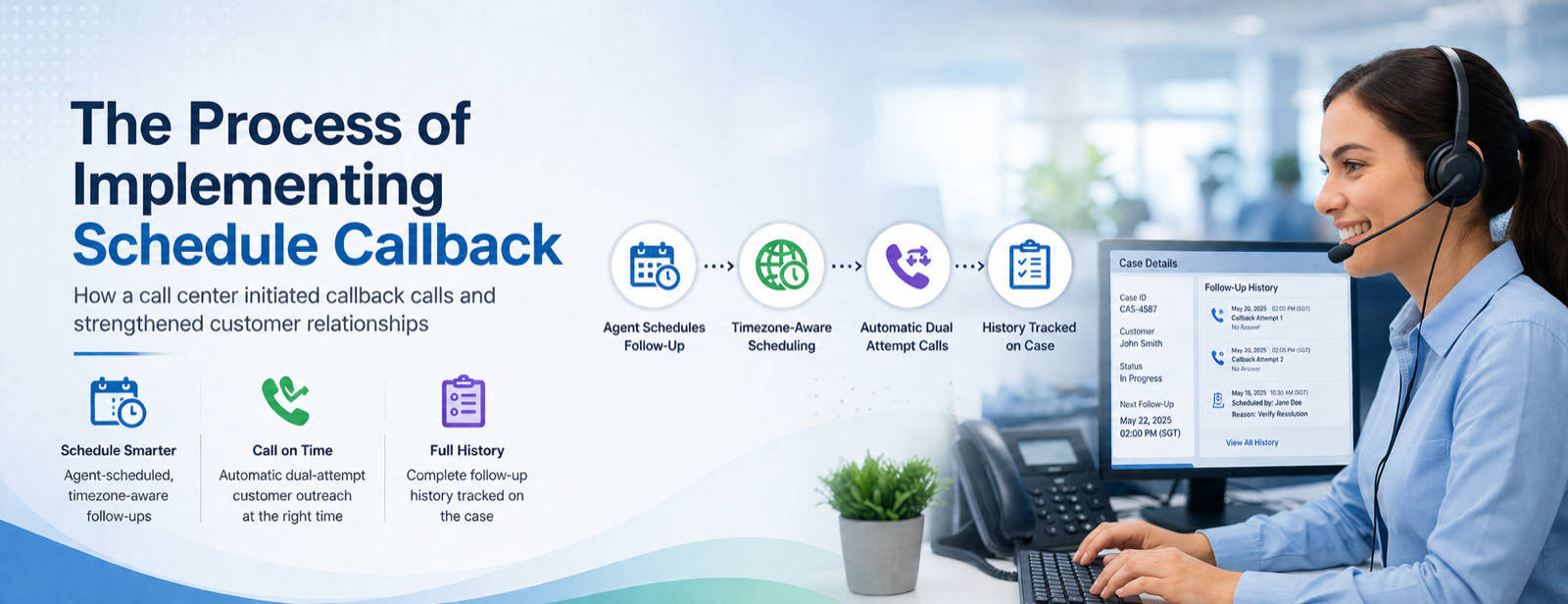
The Process of Implementing Schedule Callback


Overview
 
This client operates a multi-queue case-handling center — covering returns, repairs, and escalations — where cases routinely span multiple days and change hands between agents and shifts. Agents needed to call customers back at specific future times, but had only personal notes or memory to rely on, and customers were spread across US, APAC, and ANZ time zones, so a follow-up meant for 2 PM the customer's time could easily be logged for 2 PM UTC instead.
 
Industry
 
Returns & Repairs, Manufacturing, Logistics, Field Services
 
What the Client Asked For
 
"When an agent commits to following up with a customer, we want that follow-up to actually happen — automatically, at the right local time, with two attempts to reach them. And when we open a case, we want to see every follow-up that came before it — who scheduled it, when, and what it was for."
 
Manual Tracking and Time Zone Confusion
 
Missed Follow-Ups
 
Promised callbacks fell through when there was no structured way to schedule them — leaving customers waiting for contact that never arrived.
Time Zone Errors
 
A follow-up logged in the wrong time zone reached the customer at the wrong hour — or missed the case's service window entirely.
No Record of Past Attempts
 
Without a structured history, agents could not tell whether a customer was already contacted, what was discussed, or why the case was still open.
 
 
Solution
 
We built a follow-up scheduling drawer embedded directly inside the agent's existing case view in Amazon Connect — no separate tool, no app-switching, no extra login.
 
• Step 1 — Review the case at a glance:
The case's reference number, title, status, and a system-suggested next follow-up time are already populated, alongside a scrollable history of every follow-up scheduled before.
 
• Step 2 — Choose timezone, date, and time:
The agent selects the customer's time zone from a curated list spanning US, APAC, and ANZ regions. Past times are disabled automatically, so an invalid slot can never be chosen by accident.
 
• Step 3 — Confirm details and add notes:
The customer's phone number is pre-filled but stays editable, the follow-up reason is chosen from a defined list, and the agent can leave a free-text note for whoever picks up the case next.
 
• Step 4 — Schedule and confirm:
One click schedules the outbound customer task with two automatic attempts to reach them, and immediately appears in the Follow-Up History timeline for the next agent to see.
 
Scenario A: Cross-Region Scheduling
 
An agent in the US schedules a follow-up for a customer in Singapore. She selects the Singapore time zone, and the system converts her selection to UTC automatically — so the outbound task fires at 9 AM the customer's time, not hers.
Scenario B: Case Handed Off Overnight
 
A case is escalated overnight. Before doing anything else, the new agent opens the Smart Follow-Up drawer and sees the full history — no need to ask around or guess what happened before.
 
 
Before vs. After — The Operational Difference
 
Without This Solution
 
Agents logged follow-ups in their own time zone, unaware of the customer's, so calls landed outside business hours. There was no visible record of past attempts, nothing stopped an agent from scheduling a follow-up that had already passed, and a single missed attempt meant the promised callback simply didn't happen.
With This Solution
 
The agent selects the customer's actual time zone and the system converts it to UTC. Every scheduled follow-up is logged automatically in a Follow-Up History timeline. Past and invalid times are disabled automatically, and the system attempts the customer twice before the follow-up is considered unsuccessful.
 
Results
 
Zero Missed Calls Due to Time Zone Errors
 
Eliminated through automatic UTC conversion.
100% of Follow-Ups Logged on the Case
 
Every scheduled attempt is visible in one history view.
<60s to Schedule a Follow-Up
 
From opening the case to a confirmed, customer-ready schedule.
2x Automatic Retry Attempts
 
Per scheduled follow-up, with no manual redial needed.
Zero Follow-Ups Scheduled Without a Queue
 
Hard validation blocks incomplete cases upfront.
 
Key Learnings
 
Time Zone Handling Cannot Be Left to Manual Judgment
 
Building the conversion into the scheduling flow — not into the agent's head — removes an entire category of error before it can happen.
A History Without Structure Is Not Really a History
 
Reconstructing follow-up history from structured, tagged comments — and surfacing it as a timeline — turns a backlog of text into something an agent can act on in seconds.
Validation Should Prevent the Mistake, Not Just Report It
 
Disabling past times, enforcing a minimum lead time, and blocking scheduling on cases without an assigned queue stop an error before it is committed.
Automation Should Reduce Effort Without Removing Agent Judgment
 
The system suggests a next follow-up time and pre-fills what it already knows, but the agent can always override it.
 
Architecture
 
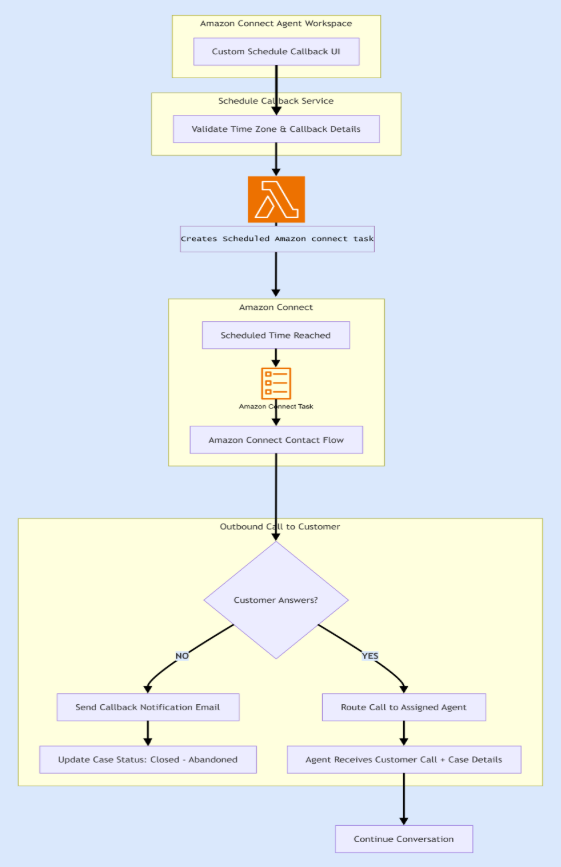
Schedule Callback flow: Custom UI → Callback Scheduling Service → Lambda → Amazon Connect Task → Contact Flow → outbound call → agent routing or notification email.
 
 
• Custom Schedule Callback UI:
Agents schedule customer callbacks directly from the case, selecting the callback date, time, customer time zone, and follow-up reason, while automatically validating criteria before submission.
 
• Callback Scheduling Service:
Validates the selected date and time, converts the customer's local time to UTC, and stores the callback information.
 
• AWS Lambda:
Creates a scheduled Amazon Connect Task that automatically triggers at the specified callback time without requiring manual intervention.
 
• Amazon Connect Contact Flow:
Initiates an outbound call to the customer and evaluates the outcome — routing to the assigned agent if answered, or triggering an email notification if not.
 
• Amazon Connect Cases:
After the callback workflow completes, the case is automatically updated based on the outcome — including marking it Closed – Abandoned if the customer cannot be reached.
 
 
Smart Follow-Up scheduling drawer, embedded directly inside the agent's case view
 
Conclusion
 
The most significant outcome was not measured in a metric — it was the restoration of trust in the follow-up process itself. When a customer is told someone will call them back, and that call arrives exactly when promised, that consistency is what turns a single resolved case into a lasting relationship.
 
Scale Your Success with Confidence
 
P3Fusion is audited and certified by industry-leading third-party standards.