
We use essential cookies to make our site work. With your consent, we may also use non-essential cookies to improve user experience and analyze website traffic. By clicking “Accept,” you agree to our website's cookie use as described in our Cookie Policy and Privacy Policy. You can change your cookie settings at any time by clicking “Preferences.”
 
 
UI Enforcement in Amazon Connect
 
Contact Center UI Enforcement
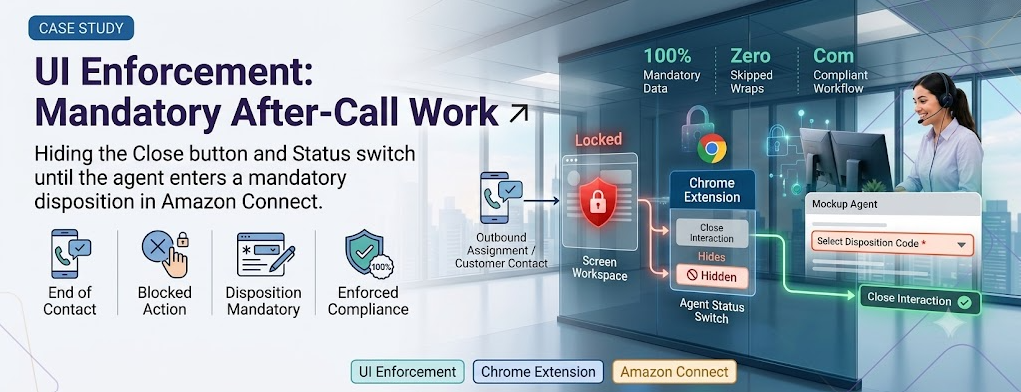
Enforcing Mandatory After-Call Work
How a lightweight Chrome extension running alongside the Amazon Connect agent workspace dynamically locks the Close button and Status switch until mandatory dispositions are completed.
100%
Disposition Completion
0
Unfinished Records
Dynamic
Screen Enforcement
Zero
Platform Disruption
 
icon
Mandatory Disposition Enforced on Every Interaction
icon
Hides Close Button & Agent Status Switch Dynamically
icon
Eliminates Premature Agent Availability Transitions
icon
Lightweight Chrome Extension Without Backend Core Changes
 
The Challenge
 
After-call work is where a contact center turns a conversation into usable data. The disposition code, and any other mandatory fields, record what the contact was about and how it ended. They support reporting, quality reviews, and compliance.
But when the screen lets agents close the interaction or change status at any time, completing that work depends on goodwill. Busy agents skip it, move to Available, and the record is left incomplete. Below are five of the most common consequences.
#Impact AreaWhat It Costs the Business
1Incomplete interaction recordsAgents move on without a disposition, leaving contacts with no outcome recorded.
2Compliance exposureMandatory after-call work that is skipped can break internal policy and regulatory expectations.
3Unreliable reportingMissing dispositions distort contact reasons, outcomes, and trend analysis.
4Status changes too earlyAgents set themselves Available before wrap-up is done, pushing the next contact on top of unfinished work.
5Supervisors chasing gapsTeam leaders spend valuable time finding and correcting records that should have been complete first time.
 
The Client
 
Our client runs a contact center on Amazon Connect, where agents handle calls and chats and must record a disposition at the end of each interaction. Data integrity and compliance are priorities, and the business wanted wrap-up to be dependable rather than optional.
 
Two issues stood out:
 
Problem 1
Interactions could be closed without a disposition
Nothing in the interface stopped an agent from closing an interaction before the mandatory fields were complete, so records were regularly left half-finished.
Problem 2
Agents could change status mid-wrap-up
Agents could switch their status before after-call work was done, which pushed new contacts onto them while earlier records were still open.
 
What They Asked For
 
“
“We can ask agents to complete their wrap-up, but we cannot rely on it. If a disposition is mandatory, the screen should make it mandatory. Agents should not be able to close the interaction or switch their status until the required fields are filled in, so that every record is complete and we stay compliant.”
— Head of Contact Centre Operations
 
How It Works
 
The solution adds the enforcement as a Chrome extension that runs alongside the Amazon Connect agent workspace. It responds to the state of the interaction and shows or hides the controls dynamically. Nothing changes in the agent’s routine except that the step they must complete is now unavoidable.
 
Step 1
Contact Ends

A customer call or chat is handled by the agent in the Amazon Connect agent workspace, and the contact ends.

Step 2
Pending Disposition Detected

As after-call work begins, the Chrome extension detects that the interaction still has a mandatory disposition outstanding.

Step 3
Controls Dynamically Hidden

The extension hides the Close button for the interaction and the Agent Status switch option, so the agent cannot leave the screen or change availability.

Step 4
Mandatory Fields Completed

The agent selects the disposition code and completes the other mandatory after-call work fields in the workspace form.

Step 5
Real-Time Validation

The extension checks that the required fields are complete. If they are not, the controls stay hidden and the agent stays on the wrap-up.

Step 6
Controls Restored & Closed

Once the disposition is entered, the extension restores the Close button and Status switch. The agent closes the interaction normally, and the record is complete.
 
Solution Architecture
 
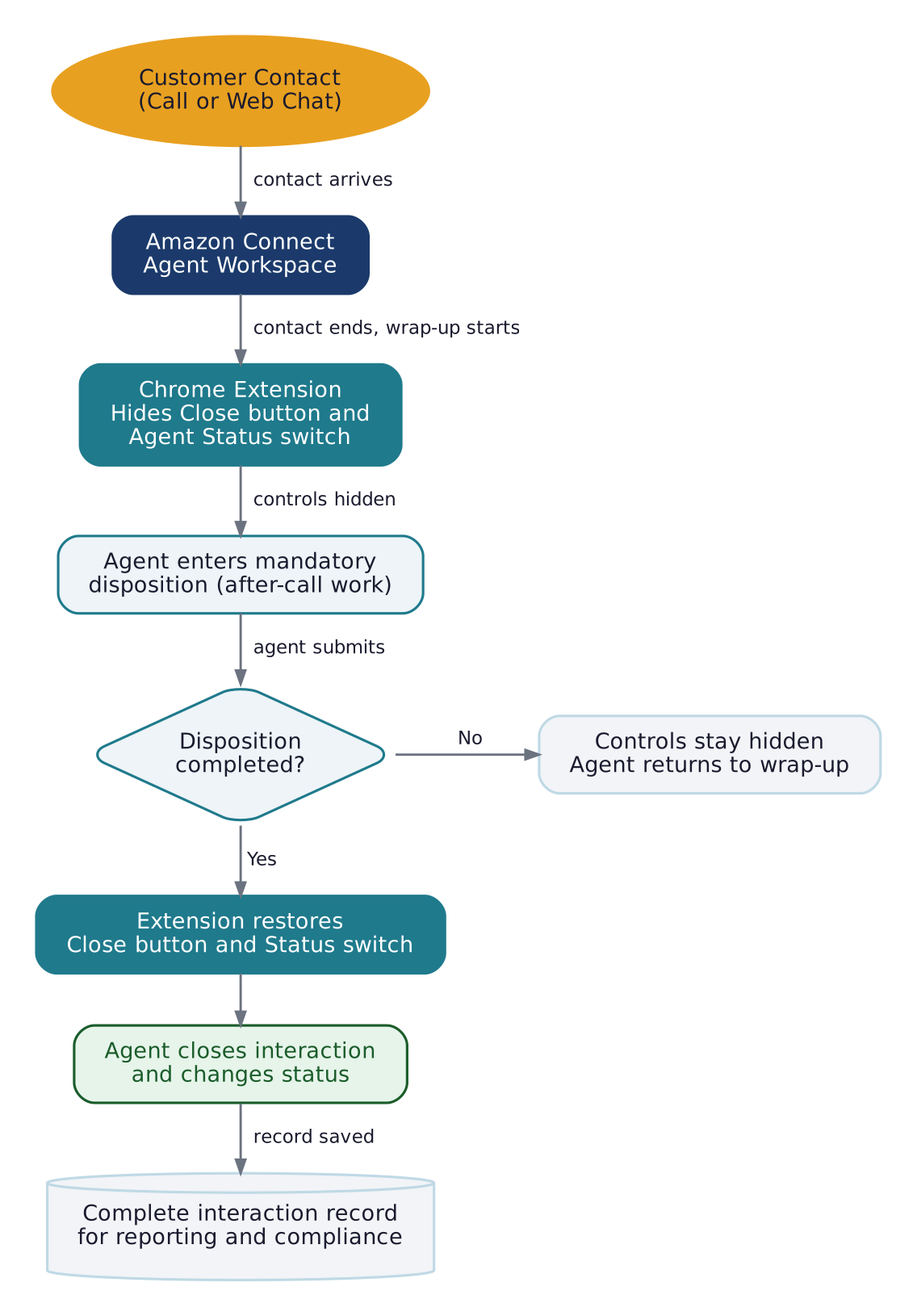
The diagram below shows the flow from the end of the contact, through the hidden controls and the disposition check, to the restored controls and a complete record.
 
UI Enforcement Architecture Flow Diagram
Preview
Architecture Flow & Components
 
  1. Customer Contact & Wrap-Up: Contact ends and wrap-up begins inside the Amazon Connect agent workspace.
  2. Chrome Extension Enforcement: The extension detects pending mandatory fields and hides both the Close button and Status switch.
  3. Mandatory Disposition Entry: The agent completes the required disposition codes and after-call notes directly in the interface.
  4. Active Validation Gate: Real-time checks verify completion; controls remain securely locked until all requirements are met.
  5. Controls Restored & Record Saved: Controls reappear immediately, enabling the agent to close the interaction and change status with full compliance.
 
Practical Examples
 
Two agents at the same company, on the same day, each finishing an interaction. The extension treats them the same way.
 
Agent A — Disposition Entered
Completed Smoothly
Situation:Billing call ends and the agent moves to wrap-up.
What Happens:
  • Close button and Status switch are automatically hidden
  • Agent selects “Payment arrangement made”
  • Controls reappear straight away
  • Agent closes the interaction and smoothly transitions to Available
Outcome: Agent A finishes in seconds, and the record is complete.
Agent B — Tries to Skip
Enforced Completion
Situation:Web chat ends and the agent is keen to take the next contact.
What Happens:
  • Close button and Status switch are hidden
  • No way to close the chat prematurely or change status
  • Agent selects “Callback scheduled”
  • Controls reappear and the agent moves on

Outcome: Agent B cannot skip the step, so no record is left blank.
 
Both agents ended up with a complete record. The difference is that Agent B could not have skipped the step even if they had wanted to.
 
Before vs. After
 
The difference UI enforcement makes to completion, agent status, and compliance.
 
AreaBeforeAfterImpact
Disposition completionAgents could close the interaction without entering a disposition, and completion depended on habit and reminders.The Close button stays hidden until the disposition is entered, so every interaction ends with an outcome recorded.100% Completion
Agent status controlAgents could change status before wrap-up was finished.The Status switch is hidden until after-call work is complete, so availability reflects real readiness.Accurate Availability
Record qualityRecords with missing fields had to be found and corrected later.Records are complete for the first time, with fewer corrections needed.Zero Missing Fields
Compliance and oversightSupervisors relied on after-the-fact checks to catch gaps.Required steps are enforced as the work happens, and supervisors spend less time chasing them.Real-Time Governance
 
Key Results
 
Following the introduction of UI enforcement, the client gained five clear improvements across operations and compliance.
 
Mandatory
Disposition Entered
Entered before an interaction can ever be closed.
Fewer
Early Closes
Zero premature closes and status changes during wrap-up.
Hidden
Controls Locked
Close button & Status switch hidden until work is complete.
Complete
First-Time Records
Accurate data captured first time, with fewer corrections needed.
Stronger
Active Compliance
Continuous compliance enforced as the work happens.
 
Key Learnings
 
Delivering this solution produced four insights about the enforcing process in the agent interface.
 
Make the right step the only step
 
Hiding the controls until the disposition is entered removes the choice to skip it. It is significantly more reliable than reminders or after-the-fact supervisor checks.
Enforce at the point of work
 
Agents get the control back the moment they finish, so the rule is clear and immediate, and it adds almost no friction to a complete wrap-up routine.
A light-touch extension can close a platform gap
 
A Chrome extension adds the enforcement on top of the existing Amazon Connect workspace, without changing the platform or waiting on product roadmaps.
Pair UI enforcement with back-end checks
 
Because the control sits in the browser, the strongest compliance setups also validate dispositions in reporting, ensuring full visibility and governance across every contact.
 
Want to Build Something Similar?
Ready to Enforce Complete Wrap-Up & Compliance in Your Contact Center?
This solution uses a Chrome extension on top of the Amazon Connect agent workspace to enforce mandatory after-call work. If your team wants complete records and consistent compliance without waiting on platform changes, reach out to discuss how a similar approach could work for you.
✓
Guaranteed Data Integrity
Zero blank dispositions or missing outcomes
✓
Seamless Agent Routine
Dynamic controls restore instantly on completion
✓
Rapid Deployment
No Amazon Connect backend infrastructure overhaul
 
Scale Your Success with Confidence
 
P3Fusion is audited and certified by industry-leading third-party standards.